
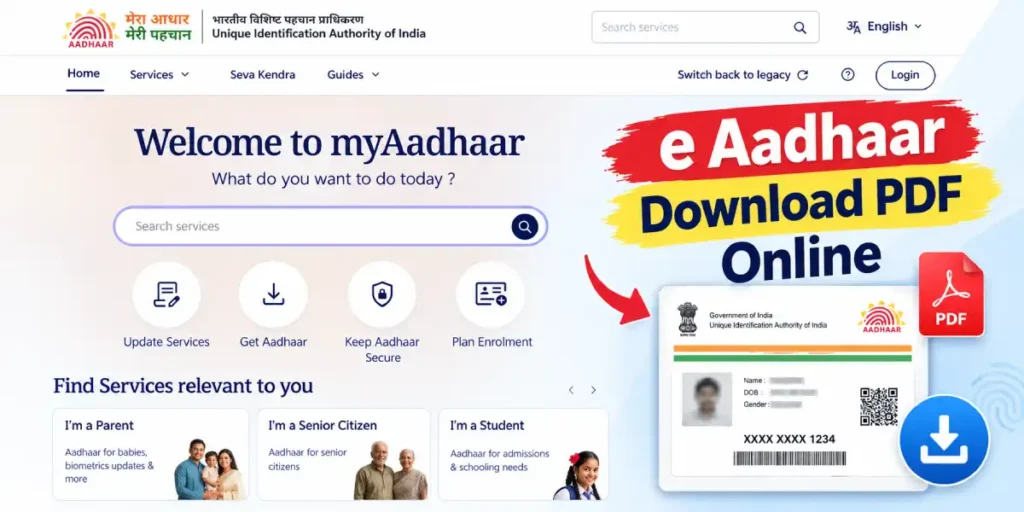
Need an instant digital copy of your identity card? The online e-aadhaar Card download service offered by the Unique Identification Authority of India (UIDAI) allows residents across India to get a digitally signed and password-protected electronic copy (e-Aadhaar) in less than two minutes. Whether you misplaced your physical card, applied for a new enrolment, or recently updated your demographic details, you can easily complete an aadhar card download from your mobile phone or computer using the official My Aadhaar Portal.
Download a digitally signed and password-protected electronic copy of your Aadhaar directly from UIDAI.
✓ Registered Mobile OTP is requiredAccording to the Aadhaar Act, a downloaded e-Aadhaar PDF is legally valid and holds the exact same authority as the physical card dispatched by India Post. Below is a complete, step-by-step guide explaining how to download your card using your 12-digit Aadhaar Number, 28-digit Enrolment ID (EID), or 16-digit Virtual ID (VID), along with instructions on how to unlock the 8-character PDF password.
Key Requirements Before Starting Your Aadhaar Card Download
Before visiting the download dashboard, keep the following details ready to ensure a smooth and error-free experience:
- Registered Mobile Number: Your mobile number must be actively linked to your Aadhaar profile to receive the 6-digit One-Time Password (OTP).
- Any One Identification Number:
- 12-Digit Aadhaar Number (UID): Printed on your existing card or acknowledgement slip.
- 28-Digit Enrolment ID (EID): Consists of a 14-digit enrolment number (in the format
XXXX/XXXXX/XXXXX) combined with the 14-digit date and time stamp (YYYYMMDDHHMMSS) printed on your enrolment slip. - 16-Digit Virtual ID (VID): A temporary, revocable 16-digit number mapped to your Aadhaar.
3 Easy Methods for Online Aadhaar Card Download
The UIDAI My Aadhaar portal provides three flexible options on a single screen. Depending on the document you have in hand, follow the relevant method below:
Method 1: Aadhaar Card Download by 12-Digit Aadhaar Number
This is the quickest method if you already know your 12-digit unique identification number:
- Visit the official My Aadhaar portal (
myaadhaar.uidai.gov.in) and click on the Download Aadhaar card option.
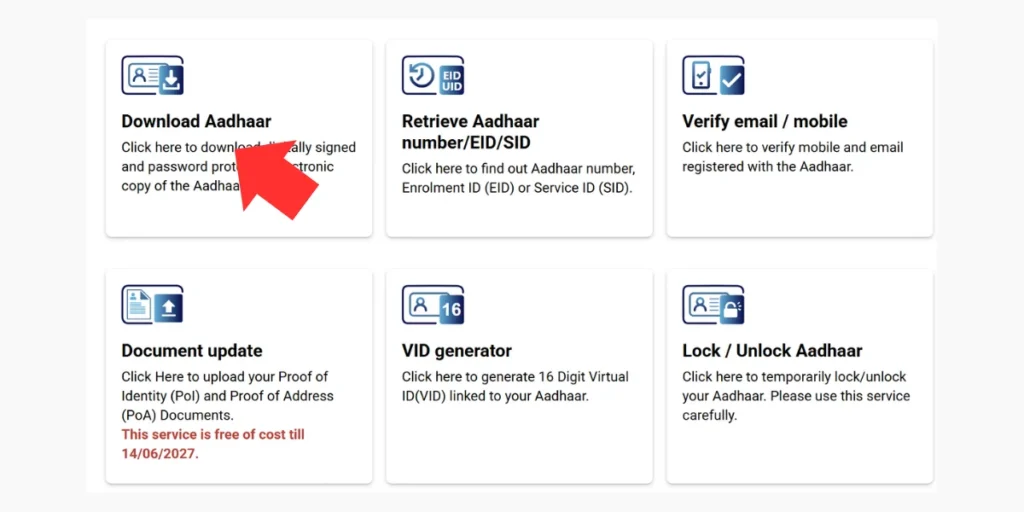
- Select the “Aadhaar Number” radio button at the top of the form.
- Enter your 12-digit Aadhaar Number carefully into the input box.
- (Optional) If you do not want your full Aadhaar number visible on the downloaded PDF, tick the checkbox that says “I want a masked Aadhaar”.
- Enter the security Captcha code displayed on the screen and click on Send OTP.
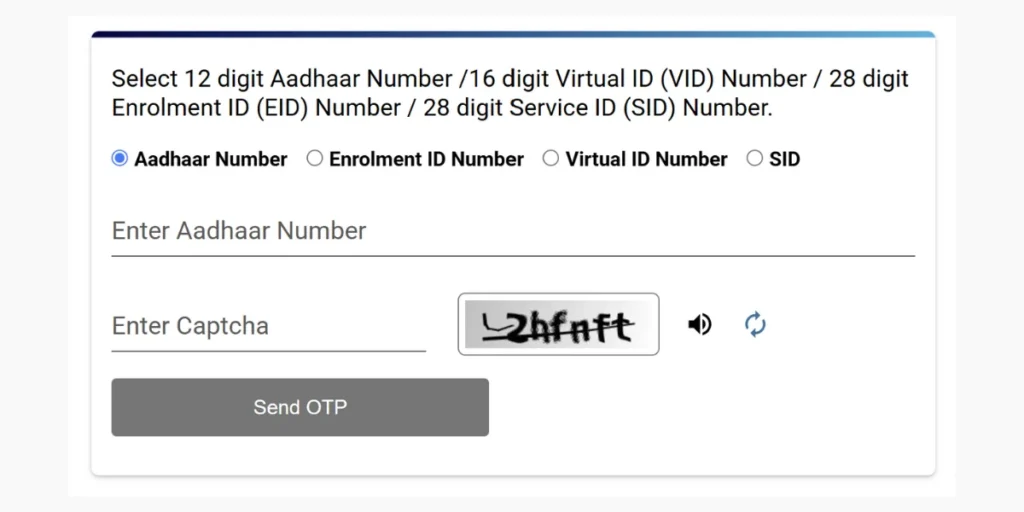
- Enter the 6-digit OTP received on your registered mobile number and click Verify & Download.
- Your password-protected e-Aadhaar PDF will immediately download to your device’s storage.
Method 2: e-Aadhaar Card Download by Enrolment ID (EID)
If you have recently enrolled for a new card at an Aadhaar Seva Kendra and have not received your physical copy by post, you can use your acknowledgement slip to download the card:
- Open the Download Aadhaar page on the portal and select the “Enrolment ID Number (EID)” tab.
- Enter your 14-digit Enrolment Number (without slashes) as printed at the top of your acknowledgement receipt.
- Select the exact Date and Time of enrolment from the calendar and clock selectors (this forms the complete 28-digit EID).
- Type the Captcha code and click on Send OTP.
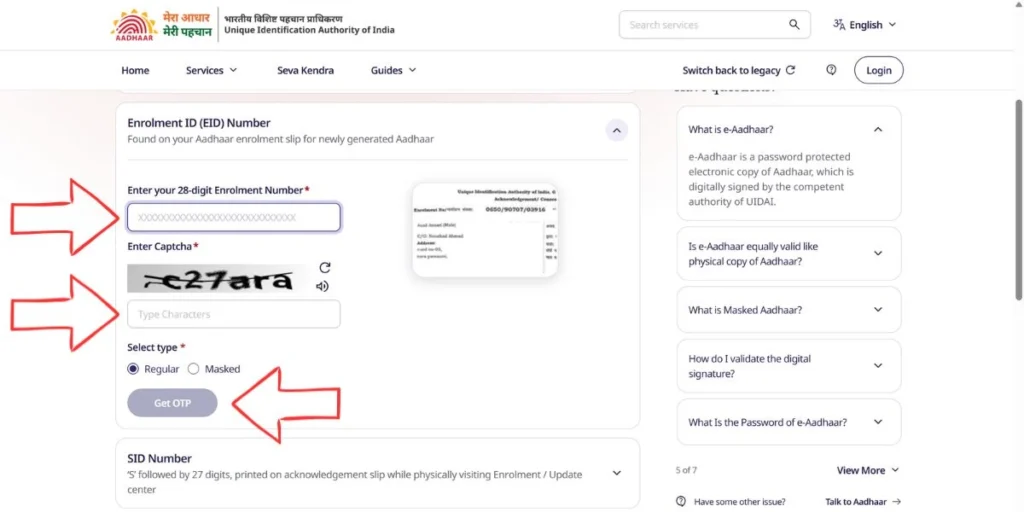
- Enter the 6-digit OTP sent to your registered mobile number and click Verify & Download to save your newly generated e-Aadhaar PDF.
Method 3: Download Aadhaar Using 16-Digit Virtual ID (VID)
For enhanced privacy, residents who use a 16-digit Virtual ID can also fetch their electronic card:
- On the Download Aadhaar screen, choose the “Virtual ID Number (VID)” option.
- Enter your 16-digit VID along with the displayed security Captcha.
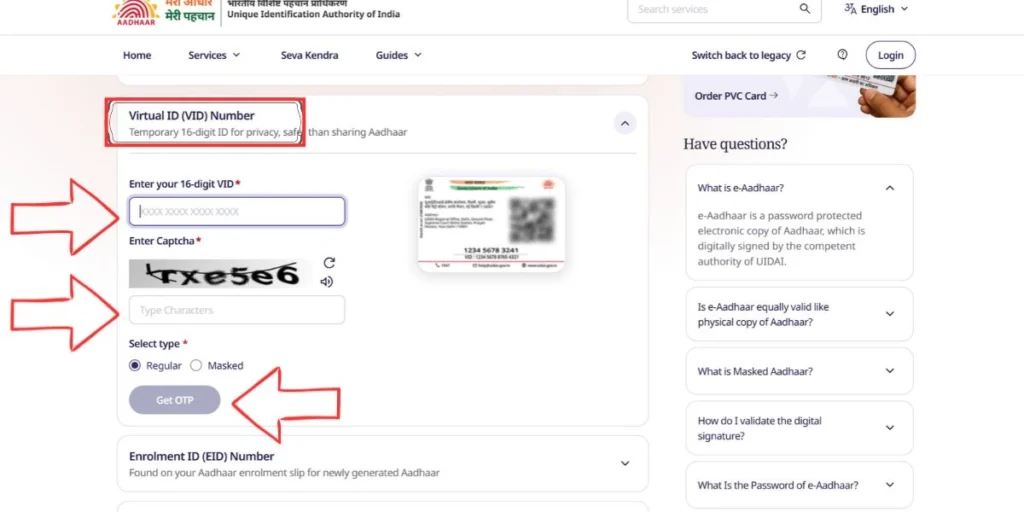
- Click Send OTP and input the verification code received via SMS.
- Click Verify & Download to get your digital copy. (If you forgot your VID, you can easily use the “Generate / Retrieve Virtual ID” option on the homepage first.)
How to Open Your e-Aadhaar PDF? (8-Character Password Format)
Every file obtained through the aadhar card download process is protected by an 8-character password to keep your personal data safe. When you double-click the downloaded PDF file, it will prompt you to enter a password.
The Password Formula:
First 4 letters of your Name (in CAPITAL letters) + Your Year of Birth (in YYYY format)
e-Aadhaar Password Examples for Different Name Formats
| Name Printed on Aadhaar Card | Year of Birth | Correct 8-Character PDF Password |
| ROHIT KUMAR | 1995 | ROHI1995 |
| PRIYA SHARMA | 2001 | PRIY2001 |
| OM PRAKASH (Space in first 4 chars) | 1988 | OMPR1988 (Ignore spaces) |
| RIA (Only 3 letters in total name) | 1999 | RIA1999 (7 characters only) |
| A. K. VERMA (Initials with dots) | 1990 | A.K.1990 (Include dots if printed) |
Note: Do not include titles like Mr., Mrs., Dr., or spaces when typing the first four letters of your name, unless initials with dots are officially printed on your card.
Regular e-Aadhaar vs. Masked Aadhaar: Which One Should You Download?
While performing an Aadhaar Card Download, the portal asks whether you want a regular copy or a Masked Aadhaar. Understanding the difference helps protect your identity from misuse:
| Feature | Regular e-Aadhaar PDF | Masked e-Aadhaar PDF |
| Aadhaar Number Visibility | Displays all 12 digits clearly on the card. | Hides the first 8 digits (e.g., XXXX-XXXX-8912) and shows only the last 4 digits. |
| Digital Signature & QR Code | Fully present and verifiable. | Fully present and verifiable. |
| Photo, Address & DOB | Clearly visible. | Clearly visible. |
| Best Used For | Government subsidies (DBT), PAN linking, passport verification, and official banking KYC. | Hotel check-ins, train/airport travel verification, private job verification, and general ID proof. |
Can You Complete an Aadhaar Download Without a Mobile Number?
One of the most common questions residents ask is how to download an Aadhaar card online without a registered mobile number.
The Official Rule: For security and privacy reasons, UIDAI stopped the facility to download an e-Aadhaar PDF online without a mobile OTP. You cannot download the PDF file from the internet if your mobile number is not linked or if you have lost the SIM card.
What are your alternatives if your mobile number is not registered?
- Visit an Aadhaar Seva Kendra (Recommended): Book an appointment or walk into your nearest Aadhaar Enrolment / Seva Kendra. Authenticate using your fingerprint or iris scan (biometrics), link your active mobile number for a nominal ₹ 50–75 fee, and get an instant e-Aadhaar printout on the spot.
- Order an Aadhaar PVC Card: If your old mobile number is inactive, you can still visit a local CSC or Seva Kendra to update your contact details and order a durable, wallet-sized Aadhaar PVC Card for ₹ 75 (inclusive of GST and Speed Post delivery to your home address).
How to Verify the Digital Signature on Your Downloaded PDF
When you open your e-Aadhaar PDF in a browser or mobile phone, you might see a yellow question mark (?) over the “Signature Not Verified” section. It is completely valid as is, but if a bank or government office asks for a green checkmark, follow these steps on a computer:
- Open the downloaded e-Aadhaar PDF using Adobe Acrobat Reader DC on a laptop or PC.
- Right-click on the “Validity Unknown” (?) icon at the bottom of the card and select Validate Signature.
- Click on Signature Properties $\rightarrow$ Show Signer’s Certificate.
- Go to the Trust tab, click Add to Trusted Certificates, and press OK.
- Click Validate Signature again—the yellow mark will immediately turn into a Green Tick ($\checkmark$) issued by NIC/UIDAI.
Frequently Asked Questions (FAQs)
-
Is there any fee for online Aadhaar Card download?
No, downloading an e-Aadhaar PDF from the official
myaadhaar.uidai.gov.inportal is 100% free of cost. You can download it as many times as you need. Only ordering a physical PVC card or updating your address online carries a ₹ 75 fee. -
Why am I not receiving the OTP during aadhar card download?
This usually happens due to temporary UIDAI server congestion or mobile network delays. Wait for 60 seconds and click “Resend OTP.” If the portal says “Mobile number not registered,” it means no phone number is linked to your Aadhaar, and you will need to visit a nearby Aadhaar Seva Kendra to link it physically.
-
How many days after enrolment can I download my new Aadhaar card?
Normally, it takes 7 to 15 working days (and in some cases up to 30–90 days for verification) after biometric enrolment for your Aadhaar to be generated. You should first check your status using the Check Enrolment / Update Status tool on the portal; once it shows “Generated,” you can download the PDF using your 28-digit EID.
-
Is a black-and-white printout of e-Aadhaar valid everywhere?
Yes! Whether you show the PDF on your smartphone, take a black-and-white printout, or print it in color on lamination paper, it is equally valid across all government departments, banks, and airports in India.